HostGar VPN Service 2026: Seguridad y Privacidad para sus clientes


El VPN servicio ofrecido por HostGar permite a los clientes proteger su conexión a Internet, ocultar su IP real, y acceso seguro a recursos privados o redes internas. Para utilizar este servicio, la aplicación recomendada y más eficiente es OpenVPN Connect, la herramienta oficial multiplataforma desarrollada por Proyecto OpenVPN. Esta aplicación es confiada por miles de usuarios de todo el mundo para conectarse a servidores VPN como los configurados en el VPS de HostGar o planes dedicados.
OpenVPN Connect destaca por su eficiencia pendiente: es ligero (bajo uso de CPU y RAM), entrega velocidades altas incluso en conexiones remotas, mantiene estabilidad excepcional (bajos índices de desconexión), soporta protocolos optimizados y minimiza el impacto de la batería en dispositivos móviles. Gracias a su diseño de código abierto y optimizaciones continuas, logra el equilibrio perfecto entre seguridad robusta y real rendimiento, superando muchas alternativas en escenarios de uso intensivo como streaming, descargas o trabajo remoto prolongado.
Características clave de OpenVPN Connect para HostGar VPN

Eficiencia en Recursos y Velocidad: Utiliza protocolos UDP/TCP altamente optimizados que reducen la latencia y maximizan el rendimiento. En pruebas reales, mantiene velocidades cercanas a 90-95% de la conexión base, incluso con cifrado completo AES‐256.
Seguridad sin compromiso: Implementa el estándar OpenVPN con encriptación de grado militar (AES‐256-GCM), perfecto secreto delantero, y apoyo para TLS 1.3. Ideal para proteger datos sensibles al conectarse a los servidores VPN de HostGar.
Estabilidad y fiabilidad: Conexiones automáticas, interruptor de matar integrado (en algunas versiones), y tolerancia para los cambios de red (Wi-Fi a datos móviles). Reduce significativamente las interrupciones en comparación con aplicaciones menos eficientes.
Bajo consumo en dispositivos móviles: En Android e iOS, optimiza el uso de baterías y datos, permitiendo largas sesiones sin drenar rápidamente el dispositivo.
Facilidad de uso con alto rendimiento: Minimalista pero potente interfaz—importar un archivo .ovpn en segundos y conectar con un clic, sin sacrificar opciones avanzadas como compresión de datos o selección de puertos.
Cross‐Platform and Scalable: Funciona de manera eficiente en todos los dispositivos y admite múltiples perfiles para diferentes servidores o configuraciones de HostGar.
Esta eficiencia hace OpenVPN Connect
Configuración rápida con OpenVPN Connect
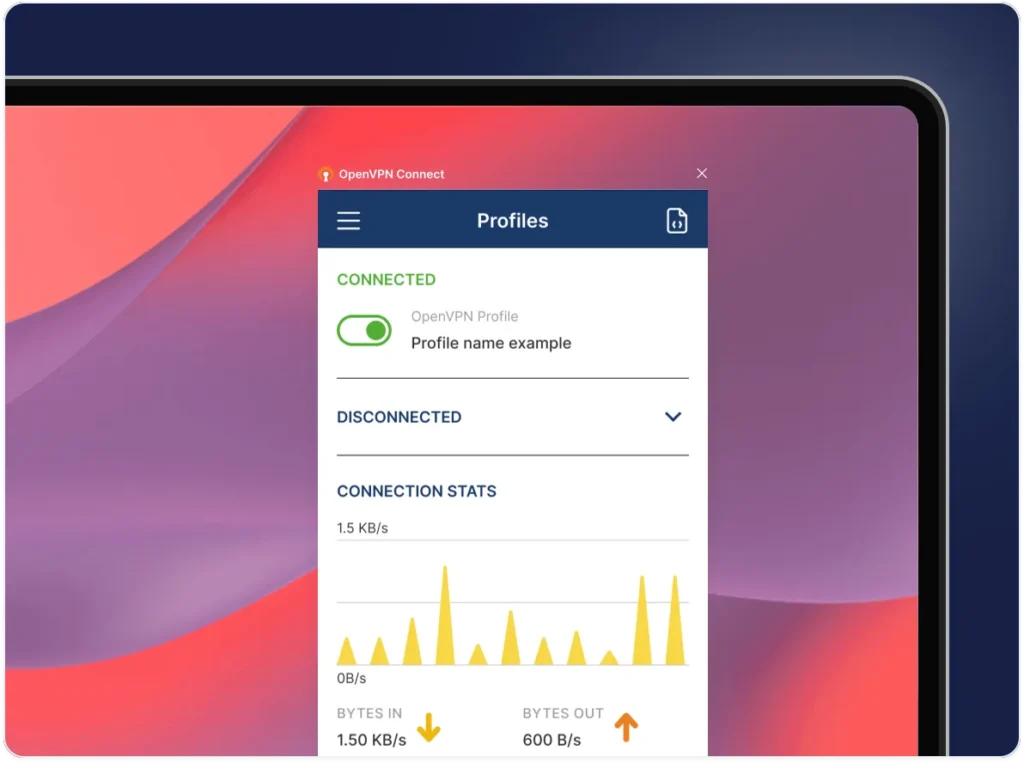
Cómo conectarse a HostGar VPN
Consigue tu archivo de configuración: El administrador del servidor (en su plan HostGar VPS/dedicado) genera y proporciona el
.ovpnarchivo (incluye dirección servidor, puerto, certificados y claves).Descargar e instalar OpenVPN Connect: Utilice los enlaces oficiales debajo de acuerdo a su dispositivo.
Importar el perfil: Abrir la aplicación → seleccionar "Import" → cargar la
.ovpnarchivo (de archivo, correo electrónico, QR o URL).Conectar: Introduzca las credenciales si es necesario → pulse "Connect". En segundos, estará protegido por el servidor VPN de HostGar.
Requisito clave para un rendimiento óptimo: Asegúrese de que ningún cortafuegos está bloqueando el puerto VPN (normalmente 1194 UDP) y que ninguna otra VPN está corriendo en el mismo dispositivo. Estas son las causas más comunes de fracasos; desactivarlas garantías temporales que OpenVPN Connect corre con la máxima eficiencia (evitando conflictos de rutas o puertos bloqueados).
Ejemplo práctico: Conexión eficiente en diferentes escenarios
En una computadora portátil de Windows (Remote Work):
Descargar OpenVPN Connect para Windows.
Importar el
.ovpnarchivo proporcionado por HostGar.Verificar: deshabilitar cualquier firewall de terceros o VPN anterior (por ejemplo, cerrar completamente otra aplicación VPN).
Conectar: en menos de 10 segundos verá "Connected" con un icono verde.
Test: your IP changes to HostGar’s server; you browse at near‑native speed with no lag in video calls or large file transfers.
On an Android Mobile (Travel or Public Wi‑Fi):
Install from Google Play Store.
Import
.ovpnvia email or direct download.Disable any VPN or firewall app (such as antivirus with integrated VPN).
Connect: the app uses very little battery and keeps the connection stable even when switching networks. Ideal for banking or corporate intranet access.
On iPhone/iPad: Similar process via App Store; efficiency is evident in long sessions without overheating or excessive battery drain.
In all cases, thanks to the efficiency of OpenVPN Connect, connecting to HostGar VPN is quick to establish, stable for hours, and has minimal impact on device performance.
Official Downloads of OpenVPN Connect
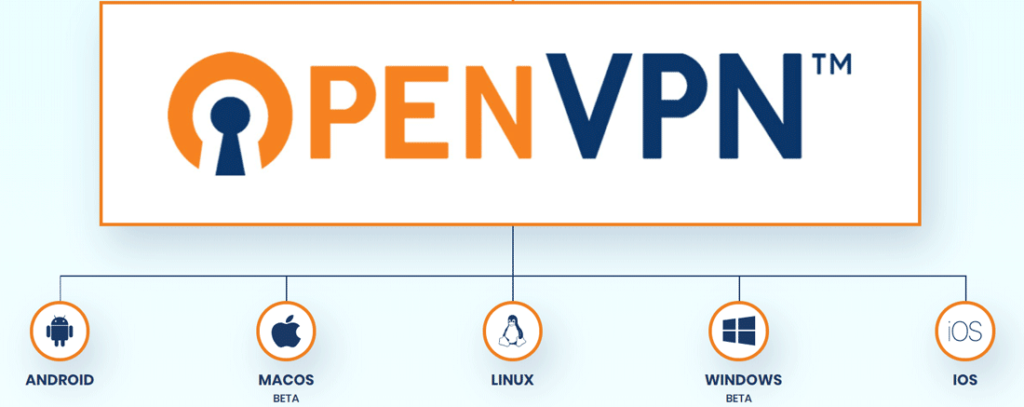
🔗 Official Downloads of OpenVPN Connect
Windows (PC): openvpn.net/client-connect-vpn-for-windows
macOS (Mac): openvpn.net/client-connect-vpn-for-mac-osx
Linux: openvpn.net/community-downloads (or via system repositories)
Android (phones & tablets): play.google.com/store/apps/details?id=net.openvpn.openvpn
iOS (iPhone/iPad): apps.apple.com/us/app/openvpn-connect/id590379981
These versions are the only official ones, optimized and regularly updated to ensure maximum security and efficiency.
OpenVPN Connect is the most efficient and reliable application to access HostGar’s VPN service. Its combination of high speed, low resource consumption, exceptional stability, and proven security makes it the perfect tool to enjoy all the advantages of a VPN hosted on our servers: total privacy, secure access, and uncompromised performance.
Always remember to check that no firewalls or concurrent VPNs are active to maximize efficiency. With OpenVPN Connect
Share on
Artículos recientes




Categorías
Etiquetas
2025 inteligencia artificial crear sitio web sitio web personalizado ciberseguridad diseño guía digital marketing digital descargar WordPress VPN gratis para PC hostgar hostgar vpn Hosting ia marketing Campañas de marketing monetizacion seguridad 2025 redes sociales telefonia voip voip vpn vpn para pc diseño web diseño web 2026 wordpress

